
Inspection and test plans and lot registers explained
What an ITP actually contains, how a lot register is built from it, and how Australian civil earthworks teams keep both current while the job is moving.
ITP, lot, lot register
Three terms that get used interchangeably on site but mean different things in the quality system.
The ITP is the plan
An inspection and test plan lists every inspection, test, hold point and witness point for an activity, in construction sequence, with the specification clause it verifies, the responsible party and the record produced.
The lot is the parcel
A lot is a defined parcel of work of uniform material, method and layer that is inspected and tested as one unit, usually described by chainage range, offsets and construction layer.
The register is the record
The lot register lists every lot, its location, quantity, ITP reference, test results, status and conformance date. It is the index the superintendent audits at handover.
What a typical earthworks ITP covers
Contents vary with the specification and the authority, but an earthworks ITP generally steps through the same construction sequence.
| Stage | Typical checks | Evidence produced | Hold or witness point |
|---|---|---|---|
| Topsoil strip | Setout and extent, strip depth, stockpile location and separation | Survey pickup, site inspection record | Witness point before strip commences |
| Subgrade preparation | Moisture conditioning, compaction density, proof roll, level and shape tolerance | Field density results, proof roll record, conformance survey | Hold point before any overlying layer |
| Fill placement | Material conformance, layer thickness, compaction per lift, moisture ratio | Source test certificates, density results per lot | Hold point at each lift release |
| Pavement layers | Grading and plasticity, thickness, density, level, surface tolerance | Laboratory results, level survey, conformance report | Hold point before sealing or overlying layer |
Always work to the ITP approved for your contract. The table above is a general illustration of common earthworks stages, not a substitute for your project specification.
What belongs in a lot register
A register that carries these fields can be audited without anyone opening a separate folder of test reports.
Lot number
A unique identifier, usually prefixed by project and layer so the number itself tells you what it is.
Location
Chainage from and to, left and right offsets, or a described area for bulk earthworks.
Construction layer
Topsoil strip, subgrade, capping, subbase, base course or a project-specific layer name.
Quantity
Area or volume covered by the lot, used for testing frequency and progress claims.
ITP reference
The inspection and test plan the lot is built under, tying each lot back to the specification clauses.
Test results
Density, moisture, level and material results, with the report numbers that hold the raw data.
Status
Awaiting inspection, awaiting testing, passed or rework required, so held work is visible at a glance.
Conformance date
The date the lot was released, which is what the superintendent audits at handover.
Want a head start? Download our free ITP and lot register templates in CSV and printable PDF, no signup required.
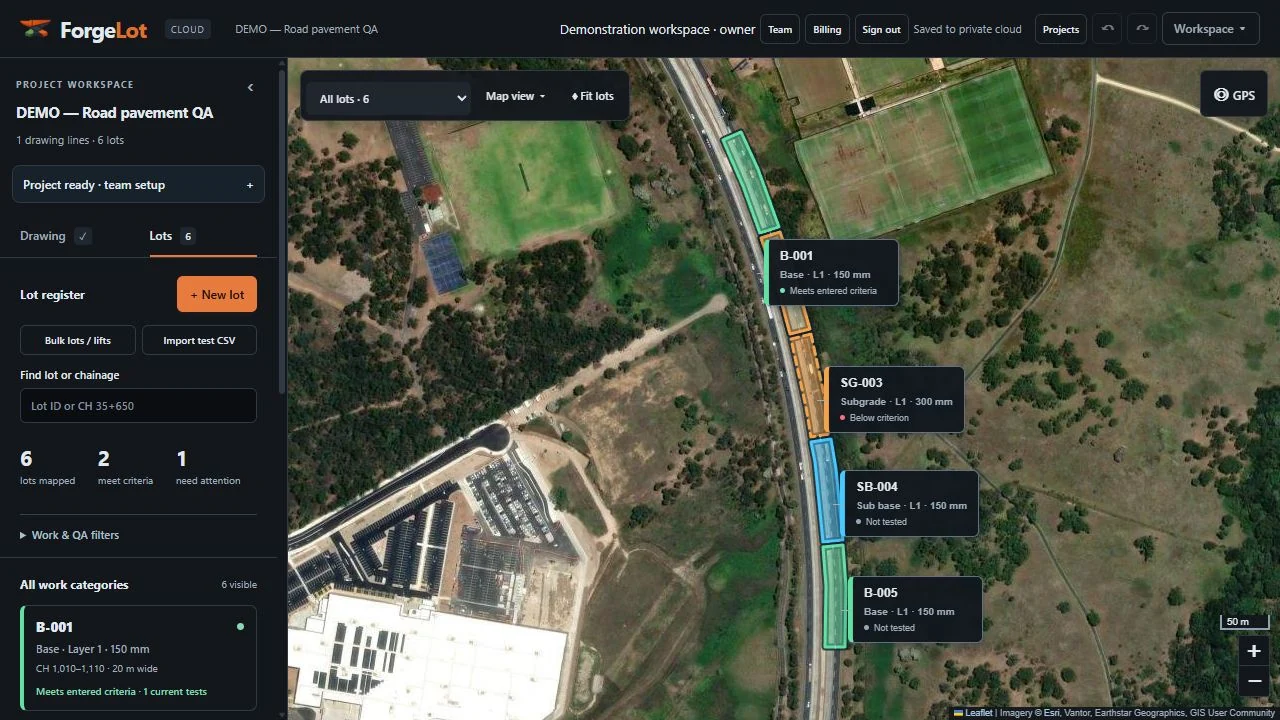
Running the register in ForgeLot
The register stops being a separate admin task once it is built from the same alignment the work is set out from.
1. Anchor the register to the alignment
Draw or import your control line, lock it and generate chainage. Every lot created after that is described in the same chainage and offset language your specification and ITPs already use.
2. Create one lot per layer, per parcel
Draw the lot by chainage range and offsets, tag its construction layer, and ForgeLot computes the area. Overlapping layers on the same ground stay separate records with separate conformance.
3. Move lots through ITP status
Set each lot to awaiting inspection, awaiting testing, passed or rework required as the hold points are released. The map recolours, so nobody covers a lot that has not been signed off.
4. Export the register for the superintendent
Export the CSV register and a printable QA pack containing the labelled map, entered test results and original evidence for project review and handover.
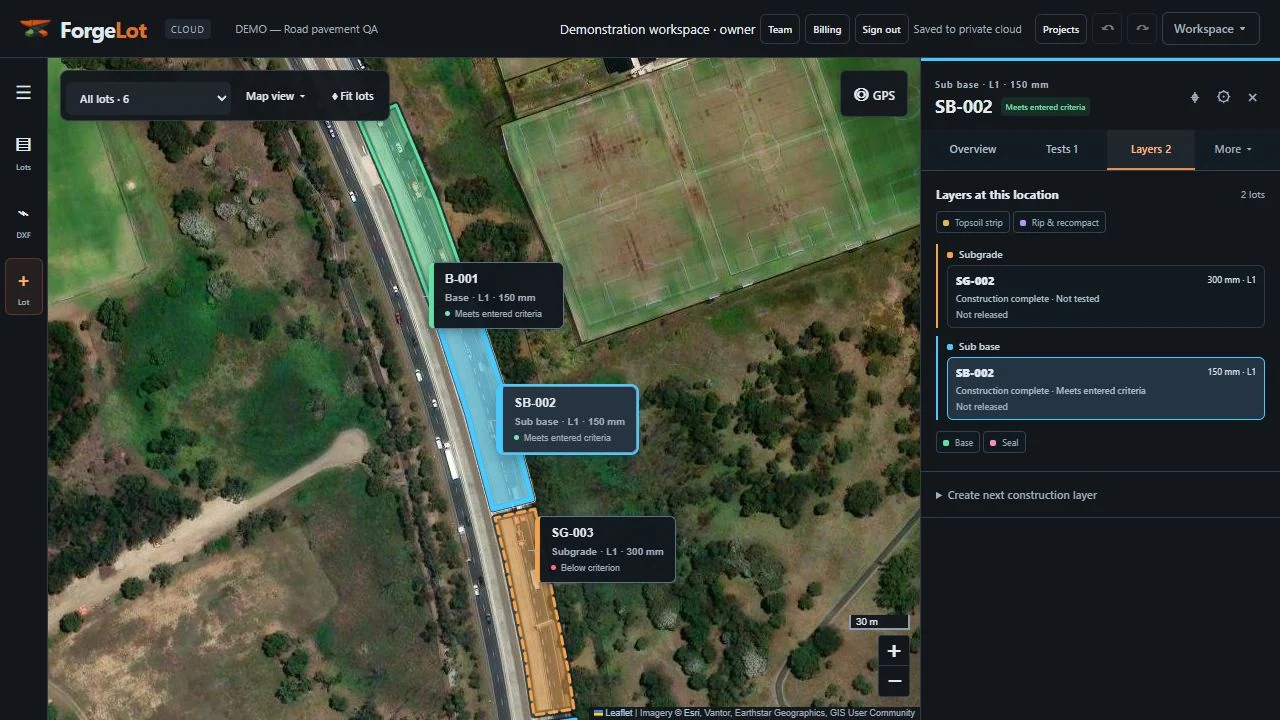
From lot status to progress and handover
Because status lives on the geometry, completion by layer and the conformance summary come from the same records the crew updates on site.
ITP and lot register FAQs
Common questions from engineers, QA leads and site supervisors setting up a lot register.
More on setup, DXF import and billing in the full FAQ.
Put your next project on the map.
No DXF needed. Draw your control line on the map, create work lots and keep every layer, test and report together.
Card required · Cancel before day 14 to avoid charges · Plans in AUD